 SRE as a Service
 DevOps as a Service
 DevOps insurance
 Kubernetes and cloud migration
 Infrastructure & CI/CD audit
 R&D and technology consulting
 Private, self-hosted LLM
 Kubernetes support
 Solution for SaaS
 All services
As the end of the year approaches, we’re catching up on the new CNCF projects as introduced by the Cloud Native community and the CNCF Technical Oversight Committee (TOC) in 2025. This article covers the first batch: 13 projects, which joined the Sandbox in January’25. It’s been quite an effort from the TOC since it’s the largest number of projects accepted in one month. This batch is also special because it features a prominent group of four projects donated by Red Hat, following their announcement made during KubeCon + CloudNativeCon NA 2024. But as always, we’ll list the projects according to their formal categories, starting with those featuring more items.
Container Runtime
1. Podman Container Tools
- Website; GitHub
- ~30k GH stars, ~800 contributors
- Initial commit: Nov 1, 2017
- License: Apache 2.0
- Original owner/creator: Red Hat
- Languages: Go
- CNCF Sandbox: sandbox request; onboarding issue; DevStats
While most of us are familiar with Podman, not everyone is aware that it was originally known as kpod and was part of CRI-O.
- CRI-O is a Container Runtime Interface (CRI) implementation created by Red Hat. Positioned as a lightweight alternative to Docker, it made its way from the kubernetes-incubator repo to a CNCF Graduated project.
- Podman was part of CRI-O, responsible for providing an “experience similar to the Docker command line,” allowing users to run standalone containers or groups of them (hence the pod in the project’s name), without involving a daemon (such as Docker Engine). It included a library called libpod and a CLI tool called podman.
Today, Podman is a modern tool with a Docker-compatible CLI interface for managing containers, groups of containers (pods), images, and volumes mounted into those containers. It is the default choice to work with containers not just in the Red Hat (RHEL and OpenShift) world, but also adopted by some other vendors, notably SUSE Linux Enterprise. Podman runs containers on Linux, but you can also use it on Mac and Windows via podman machine (a virtual machine will be launched with a guest Linux system that starts containers).
Perhaps the most well-known distinguishing feature of Podman is its focus on security, thanks to being daemonless and, thus, running in rootless mode. Another prominent feature is an ecosystem of related tools where Podman Desktop stands out. Since the latter also joined the CNCF Sandbox recently, more on it will follow below.
According to the Stack Overflow 2025 survey, approximately 11% of developers worldwide use Podman, compared to 71% for Docker.
2. bootc
- Website; GitHub
- ~1700 GH stars, 70+ contributors
- Initial commit: Nov 30, 2022
- License: Apache 2.0 and MIT
- Original owner/creator: Red Hat
- Languages: Rust
- CNCF Sandbox: sandbox request; onboarding issue; DevStats
bootc provides an API and CLI for in-place operating system updates using OCI images. The idea behind this project is to apply Docker-inspired layers to the host operating systems by shipping relevant OS updates in container images. By doing so, bootc aims to “encourage a default model where Linux systems are built and delivered as (container) images.” Thus, here’s what it does:
- runs a bootable container image with the Linux kernel onboard;
- checks for new operating system updates available in a registry and downloads them;
- applies them;
- rollbacks to the previous deployment if/when needed.
The project works with two bootloaders, bootupd from Fedora CoreOS and systemd-boot. It uses OSTree for storing container images on top of an OSTree-based system for the booted host. Linux package managers, such as apt and dnf, can be used during container build time. Some of its experimental features include using composefs (see more below) as an alternative storage backend, interactive progress tracking, and a factory reset for existing bootc systems.
3. composefs
- GitHub
- 600+ GH stars, ~30 contributors
- Initial commit: Oct 26, 2021
- License: Apache 2.0, GPL 2.0, LGPL 2.1
- Original owner/creator: Red Hat
- Languages: C
- CNCF Sandbox: sandbox request; onboarding issue; DevStats
Following the “The reliability of disk images, the flexibility of files” motto, the composefs project allows you to create disk images that are both reliable and flexible. They can be used for container images and bootable host systems, such as OSTree or the above-mentioned bootc. While it doesn’t store the data itself, it provides several features on top of existing filesystems. Its main principles and unique features are:
- Using overlay as the kernel interface.
- Storing data (regular files) separately from the metadata. The EROFS filesystem is used (mounted via loopback) to have a metadata tree.
- Content-addressed storage of common files, enabling multiple mounts for the same shared data.
- Sharing data files not only on disk, but also in the page cache.
- Using fs-verity to validate content files.
The project provides two CLI tools with self-explanatory names, mkcomposefs and mount.composefs, and language bindings for Rust.
Scheduling & Orchestration
4. k0s
- Website; GitHub
- ~5600 GH stars, ~130 contributors
- Initial commit: Jun 10, 2020
- License: Apache 2.0
- Original owner/creator: Mirantis
- Languages: Go
- CNCF Sandbox: sandbox request; onboarding issue; DevStats
k0s is a well-known minimal Kubernetes distribution, distinguished by a simple design. Essentially, it is a vanilla version of Kubernetes, provided as a single binary that has minimal system requirements, no host dependencies (assuming you have a Linux kernel with specific modules and configurations) and is easy to run. The same simplicity applies to operating such a K8s cluster, thanks to the k0sctl CLI tool that can be used to upgrade the Kubernetes version and backup/restore your cluster.
With k0s, you can run single-node, multi-node, and air-gapped Kubernetes setups using bare-metal and on-prem infrastructure, edge and IoT environments, or in public and private clouds. The project aims to be as non-opinionated as possible by providing its users freedom to choose their preferred K8s components instead of embedding them. That’s why k0s is based on the vanilla codebase and supports:
- various store backends for Kubernetes, including SQLite (default for single nodes), etcd (default for multi-node setups), MySQL, and PostgreSQL;
- custom CRI plugins, with containerd as a default option;
- custom CNI plugins, with kube-router by default and Calico as a ready-to-use alternative;
- all CSI plugins.
A month ago, k0s submitted an official request to move to the Incubating level.
5. KubeFleet
- Website; GitHub
- 100+ GH stars, ~30 contributors
- Initial commit: May 3, 2022
- License: Apache 2.0
- Original owner/creator: Microsoft
- Languages: Go
- CNCF Sandbox: sandbox request; onboarding issue; DevStats
KubeFleet calls itself a “multi-cluster application management” solution for Kubernetes. It aims to assist the operators of multi-cluster setups in:
- orchestrating workloads. For example, to deploy some Kubernetes resources on member clusters via the hub cluster;
- scheduling workloads. KubeFleet’s scheduler comes with several built-in plugin types responsible for scheduling: topology spread, cluster affinity, same placement affinity, cluster eligibility, and taint & toleration. Depending on the plugin type, they may have different extension points, such as pre-filter/filter, pre-score/score, and batch/post-batch;
- rolling out the changes. The only strategy, RollingUpdate, is currently available. It features staged rollouts for complex deployments.
KubeFleet implements the agent-based pull mode, involving two Kubernetes controllers: fleet-hub-agent (it creates and reconciles resources in the hub cluster) and fleet-member-agent (does the same for the member cluster by pulling the latest resources from the hub).
The project’s documentation includes a tutorial on Argo CD integration that explains how you can combine these tools to benefit from the GitOps approach in multi-cluster deployments.
Orchestration & Management
6. SpinKube
- Website; GitHub
- 6200+ GH stars, 80+ contributors
- Initial commit: May 13, 2022
- License: Apache 2.0
- Original owner/creator: Fermyon
- Languages: Rust
- CNCF Sandbox: sandbox request; onboarding issue; DevStats
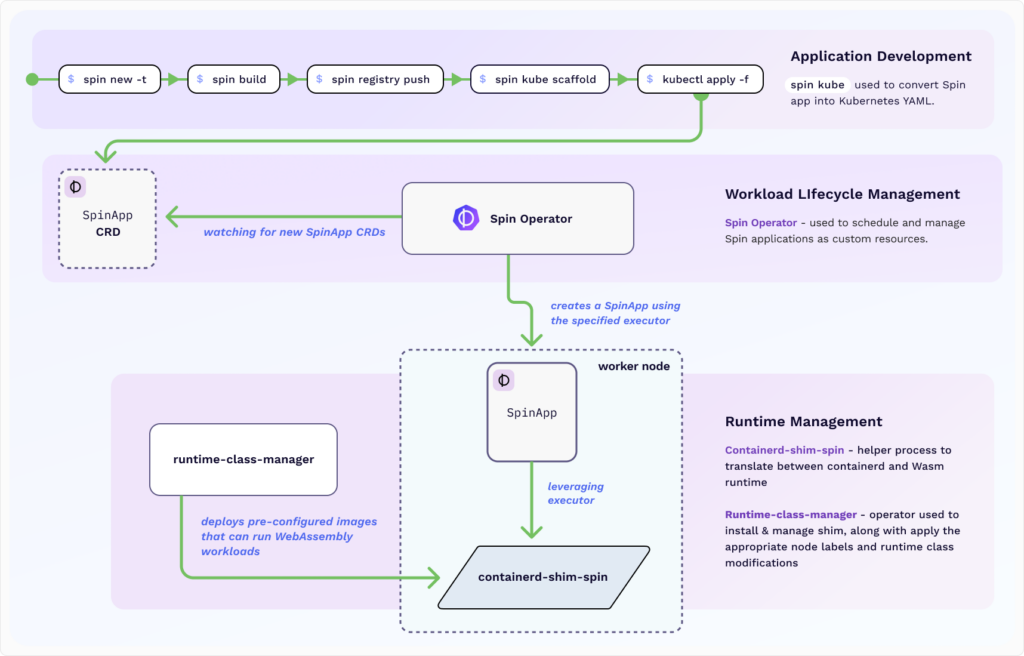
SpinKube helps to develop, deploy, and operate WebAssembly workloads in Kubernetes. The project comes with lots of components — I’ll list the most prominent ones, and this alone can explain what SpinKube offers and how it’s designed:
- Spin as a framework and CLI tool to create, distribute, and execute Wasm applications;
- Spin SDKs for various programming languages. The officially supported ones are JavaScript, Rust, Go, and Python;
- APIs provided in those SDKs are feature-rich, allowing developers to use HTTP and Redis triggers, key-value store (SQLite, Redis, Valkey, and Azure Cosmos DB), and relational databases (MySQL and PostgreSQL);
- Spin Operator to deploy and run Wasm apps, defined as custom resources, in Kubernetes;
- Containerd Shim Spin as a runtime shim implementation used for Spin apps managed by containerd;
- Runtime Class Manager as another Kubernetes operator focused on managing the containerd shims lifecycle, such as configuring, installing, and updating them;
- Spin Kube Plugin that enables CLI commands simplifying Spin apps management in Kubernetes, such as deploying them and controlling autoscaling settings.
Spin applications can use variables from Kubernetes objects (ConfigMaps and Secrets) and external providers (Vault and Azure Key Vault). Here’s a detailed high-level overview of how SpinKube operates:
For observability, SpinKube exports data to the OpenTelemetry collector, which can then send traces to Jaeger. There is also an integration with KEDA for autoscaling.
7. container2wasm
- GitHub
- ~2500 GH stars, ~10 contributors
- Initial commit: Feb 28, 2023
- License: Apache 2.0
- Original owner/creator: Kohei Tokunaga (individual)
- Languages: Go
- CNCF Sandbox: sandbox request; onboarding issue; DevStats
container2wasm is also a WebAssembly-related project. Essentially, it converts container images to Wasm using various emulators:
- Bochs for x86_64 containers;
- TinyEMU for riscv64 containers;
- or QEMU.
Such a conversion produces a WASI image that runs the container via runc and the Linux kernel on the emulated CPU. You can run the resulting WASI image on:
- WASI runtimes, including wasmtime, wamr, wasmer, wasmedge, and wazero;
- web browser, using browser_wasi_shim or as a regular JavaScript file when converted with Emscripten.
Beware that container2wasm is still considered experimental, so use it at your own risk.
Application Definition & Image Build
8. Podman Desktop
- Website; GitHub
- 7000+ GH stars, 150+ contributors
- Initial commit: Mar 8, 2022
- License: Apache 2.0
- Original owner/creator: Red Hat
- Languages: TypeScript
- CNCF Sandbox: sandbox request; onboarding issue; DevStats
Podman Desktop is another recent Sandbox addition from Red Hat that is obviously related to Podman. The first impression might be “it’s like Docker Desktop, but for Podman.” However, since it also works with Docker (and a few other container engines), it would be more fair to position Podman Desktop as a free and Open Source alternative to Docker’s proprietary solution.
In Podman Desktop, you can manage containers, images, pods (groups of containers, as mentioned above in regard to Podman Container Tools). Since it’s a mature and feature-rich product today, stating that you can use this GUI to create/delete containers, check their status, and view their logs is boring. Thus, I’d better focus on the less expected features that Podman Desktop brings.
First of all, there is a rich set of extensions. Here’s what they offer:
- Managing registries in use, with pre-defined configurations for Docker Hub, GitHub, Google Container Registry, and Red Hat Quay.
- Support for Linux virtual machines from Lima.
- Support for Kubernetes-related projects, such as Kind, Minikube, and Headlamp UI.
- Podman AI Lab to work with LLMs in a local environment. You will need a GPU-enabled Podman machine for GPU workloads.
- Integration with Red Hat-related software, including RHEL VMs, RHEL Lightspeed, and OpenShift Local.
- Other things, such as creating bootable containers (based on bootc) and even managing local PostgreSQL instances on Podman.
Secondly, Kubernetes support in Podman Desktop, implemented through various extensions, enables the creation of a cluster, migration of containers, and deployment of pods. Furthermore, you can manage the most common Kubernetes objects, such as Nodes, Deployments, ConfigMaps, and Jobs, view the cluster overview state and per-resource details, apply configuration changes, and configure port forwarding.
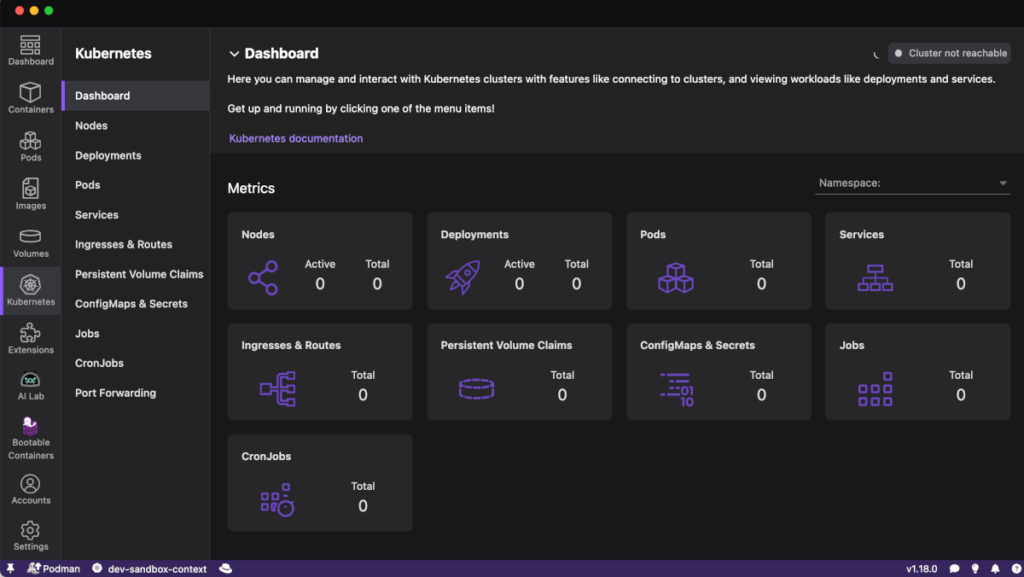
Finally, Podman Desktop UI is customizable thanks to configurable components in your navigation pane, navigation bar layout, and other settings.
Automation & Configuration
9. Runme Notebooks for DevOps
- Website; GitHub
- 1700+ GH stars, ~30 contributors
- Initial commit: Jul 18, 2022
- License: Apache 2.0
- Original owner/creator: Stateful
- Languages: Go
- CNCF Sandbox: sandbox request; onboarding issue; DevStats
Runme aims to make DevOps-related documentation more practical by embedding code into it and making it more actionable. It’s built on top of Markdown, but extends it with several important capabilities:
- Executable commands and code;
- Configurable output;
- Environment dependencies (configuration and secrets);
- Integrations with CLIs, cloud consoles, and third-party APIs.
These enhancements help turn static documentation into so-called notebooks, which are similar to what’s known as runbooks or playbooks in the Ops world. Thus, your documentation becomes not only something to read but also an essential part of automating efforts for the tasks typically performed by Ops engineers.
There are plenty of configurations you can apply to specific code blocks, such as changing the current working directory, running the code in the background, or enabling interactive input. Runme’s UI is built on the VS Code platform and provides multiple client interfaces for interaction. They include VS Code and Open VSX extensions, integrations for Cloud Development Environments (such as GitHub Codespaces and Gitpod), a self-hosted web interface, and even a CLI for your terminal.
If you opt for one of the visual clients, you will be empowered with numerous handy features, such as changing the configuration of a given code block, running it straight in the UI (thanks to the embedded terminal), or creating gists. Here’s an illustration of what Runme’s web UI offers:

For further automation, Runme supports manual workflows in GitHub Actions, which can be used to trigger jobs on demand — for example, running infrastructure tests or providing more details in incident responses.
The project’s documentation provides various guides on writing and using Runme notebooks for different cloud providers and popular technologies, from Kubernetes-related kubectl, Helm, Argo CD, and Istio to Docker, Terraform, and Dagger.
Installable Platform
10. SlimFaas
- Website; GitHub
- ~400 GH stars, 10+ contributors
- Initial commit: Mar 6, 2023
- License: Apache 2.0
- Original owner/creator: AXA France
- Languages: C#
- CNCF Sandbox: sandbox request; onboarding issue; DevStats
SlimFaas positions itself as “the slimmer and simplest Function-as-a-Service (FaaS)” platform that works on Kubernetes and Docker Compose. The project addresses autoscaling — one of the biggest challenges for serverless workloads — with an opinionated, thoughtful approach:
- It allows waking the application up not only based on a specific schedule or active HTTP traffic, but also by monitoring Kafka topics.
- It features metrics-based autoscaling based on PromQL queries, which evaluate the necessity to scale further when workloads are running.
- It comes with configurable scaling policies and stabilization windows similar to what HPA/KEDA offers for Kubernetes.
Technically, SlimFaas operates as an HTTP proxy intercepting requests for functions, jobs, and events. It is deployed on Kubernetes as a Deployment or StatefulSet. Its Pod hosts a pack of workers, and the data is stored in a built-in key-value store based on Raft, implemented using the .NET platform’s dotNext. You can control scaling, timeouts, and other parameters using annotations.
Security & Compliance
11. Tokenetes
- Website; GitHub
- 50+ GH stars, 2 contributors
- Initial commit: Mar 21, 2024
- License: Apache 2.0
- Original owner/creator: SGNL
- Languages: Go
- CNCF Sandbox: sandbox request; onboarding issue; DevStats
This project, originally known as Tratteria, implements Transaction Tokens, an active draft from the OAuth protocol working group in the IETF (Internet Engineering Task Force). Here’s the idea behind these tokens from the official specification abstract:
Transaction Tokens (Txn-Tokens) are designed to maintain and
propagate user identity and authorization context across workloads
within a trusted domain during the processing of external
programmatic requests, such as API calls. They ensure that this
context is preserved throughout the call chain, even when new
transactions are initiated internally, thereby enhancing security and
consistency in complex, multi-service architectures.
Technically, transaction tokens are short-lived signed JSON Web Tokens (JWTs) that provide immutable identity and context information in microservices. The tokens are created when a workload is invoked and then used to authorize all the calls; otherwise, they would be denied.
As a Kubernetes-native framework, Tokenetes aims to bring this security feature to the workloads running in K8s clusters. Its implementation involves three components:
- a Tokenetes Service for issuing transaction tokens,
- a Tokenetes Agent sidecar for verifying tokens,
- Kubernetes Custom Resources defining generation and verification rules for tokens.
To ensure trust between services, applications need to implement SPIFFE (Secure Production Identity Framework For Everyone), which is a CNCF Graduated project that provides a secure identity for workloads.
Database
12. CloudNativePG
- Website; GitHub
- 7500+ GH stars, 190+ contributors
- Initial commit: Feb 21, 2020
- License: Apache 2.0
- Original owner/creator: EDB
- Languages: Go
- CNCF Sandbox: sandbox request; onboarding issue; DevStats
CNPG gained recognition from the Cloud Native community even before joining the CNCF Sandbox. Actually, it attempted to join CNCF much earlier than now, in 2022, but it didn’t succeed at that point. The situation is very different today: CloudNativePG is a Sandbox project that has already submitted a request to move forward to the Incubating maturity level a month ago.
Essentially, CNPG is all about operating vanilla PostgreSQL instances within vanilla Kubernetes environments. It implements a Kubernetes-native approach (i.e. using an operator to interact with the K8s API) for managing primary and standby PgSQL clusters and offers a lot for making it simple and efficient.
What is CNPG capable of? Actually, we published an in-depth overview of CloudNativePG, including its comparison with other existing solutions, a few years ago. Here’s a gist of the main CloudNativePG features available today:
- Declarative PostgreSQL configurations;
- Various PostgreSQL setups: any number of instances, dynamic scaling up/down, quorum-based and priority-based synchronous replication, distributed topologies across multiple K8s clusters;
- Planned switchover and self-healing capabilities with automated failover by promoting one of the replicas and recreating failed replicas;
- Persistent volume management, including support for local persistent volumes with PVC templates and separate volumes for WAL files and tablespaces;
- TLS support (including custom certificates) and encryption at rest;
- Error logging in the JSON format and Prometheus-compatible metrics exporter;
- Declarative rolling updates for PostgreSQL minor versions and operator upgrades, offline in-place upgrades for major versions;
- Advanced backup capabilities using native methods (continuous backups and recovery via volume snapshots) or Barman Cloud plugin;
- Integration with well-known PostgreSQL extensions and tools, such as PgBouncer, PgAudit, and PostGIS;
- Integration with other Cloud Native tools, including cert-manager and External Secrets Operator;
- An experimental modular approach for plugins (CNPG-I).
Seeing this amount of CloudNativePG features, as well as its huge community backed by numerous internationally recognized commercial adopters (e.g., IBM, Google Cloud, and Microsoft Azure), makes the intention of moving this project to the Incubating level totally reasonable.
Streaming & Messaging
13. Drasi
- Website; GitHub
- ~1200 GH stars, 10+ contributors
- Initial commit: Sep 26, 2024
- License: Apache 2.0
- Original owner/creator: Microsoft
- Languages: C#, Rust
- CNCF Sandbox: sandbox request; onboarding issue; DevStats
Drasi is a data processing platform that tracks logs from existing databases (or other software systems) and performs specific actions when needed. The whole process can be split into three big steps:
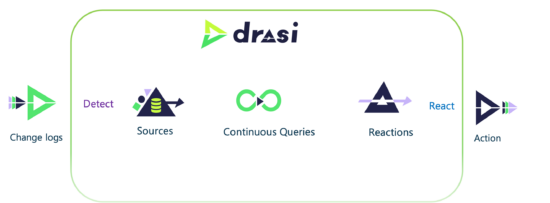
- Sources are where the logs originate. Currently, the following technologies are supported: Kubernetes, MySQL, PostgreSQL, Microsoft SQL Server, and a few Microsoft/Azure-related products. However, you’re not limited to these options, as it can be extended to other systems with a “low-level change feed and a way to query the current data in the system.” Moreover, its input schema is modeled on Debezium, which comes with great potential for leveraging existing connectors.
- Continuous queries are a special kind of query that is performed to see how the data changes. Unlike regular database queries, which we execute occasionally, these are an ongoing process that allows us to see the changes that are currently happening (e.g., what elements are being added or modified). Technically, they are implemented as graph queries written in the Cypher Query Language. A couple of months ago, support for Graph Query Language (GQL) queries in Drasi was also introduced.
- Reactions are attached to continuous queries and execute the actions when needed. For example, they can pass some processed data from the changes to the commands to be executed on the source database. Currently, the following reaction methods are implemented: forwarding changes to Azure Event Grid and ASP.NET SignalR, executing commands and stored procedures on the databases.
Drasi can be installed on Docker or a Kubernetes cluster, with ready-to-use tutorials provided for various distributions, including AWS EKS, Azure AKS, k3s, and kind. The project also features a VS Code extension that simplifies Drasi resource management and debugging of continuous queries.
Afterword
As we’ve observed in our previous overviews (see the links below), projects joining CNCF are mostly 2-3 years old. This batch stands out with a few strong veterans (Podman Container Tools, k0s, and CNPG) that were launched between 2017 and 2020, which are more or less balanced by four projects born in 2023-2024. For companies, Red Hat is a prominent leader this time, thanks to its bold move affecting the four projects I mentioned in the beginning. Microsoft is also consistent in donating its software to CNCF, with two additions we see this time.
For categories, security and AI/ML are not leaders for this batch. It’s been more about low-level things (container runtime) and orchestration in its different manifestations.
While Go remains the most popular language for Cloud Native projects, the diversity in this batch is impressive, as three projects rely on Rust, two on C#, and we also have C and TypeScript.
Throughout 2025, 16 more new CNCF Sandbox additions have been made, which we will cover soon in our blog.
P.S. Other articles in this series
- Part 4: 13 arrivals of 2024 H2: Ratify, Cartography, HAMi, KAITO, Kmesh, Sermant, LoxiLB, OVN-Kubernetes, Perses, Shipwright, KusionStack, youki, and OpenEBS.
- Part 3: 14 arrivals of 2024 H1: Radius, Stacker, Score, Bank-Vaults, TrestleGRC, bpfman, Koordinator, KubeSlice, Atlantis, Kubean, Connect, Kairos, Kuadrant, and openGemini.
- Part 2: 12 arrivals of 2023 H2: Logging operator, K8sGPT, kcp, KubeStellar, Copa, Kanister, KCL, Easegress, Kuasar, krkn, kube-burner, and Spiderpool.
- Part 1: 13 arrivals of 2023 H1: Inspektor Gadget, Headlamp, Kepler, SlimToolkit, SOPS, Clusternet, Eraser, PipeCD, Microcks, kpt, Xline, HwameiStor, and KubeClipper.

Comments