 SRE as a Service
 DevOps as a Service
 DevOps insurance
 Kubernetes and cloud migration
 Infrastructure & CI/CD audit
 R&D and technology consulting
 Private, self-hosted LLM
 Kubernetes support
 Migration from Vercel
 Solution for SaaS
 All services
 DevOps and SRE as a Service comparison

Everyone knows that asynchronous replication failovers — whether performed by Patroni or another tool — can result in lost data. This occurs in situations where certain transactions committed on the leader haven’t managed to reach the replica before a failover.
However, even if the replica is fully in sync with the leader, data loss during a failover may still occur if you’re using logical replication on top of a physical one. You may encounter this problem in a typical PostgreSQL replication setup, such as the one below:
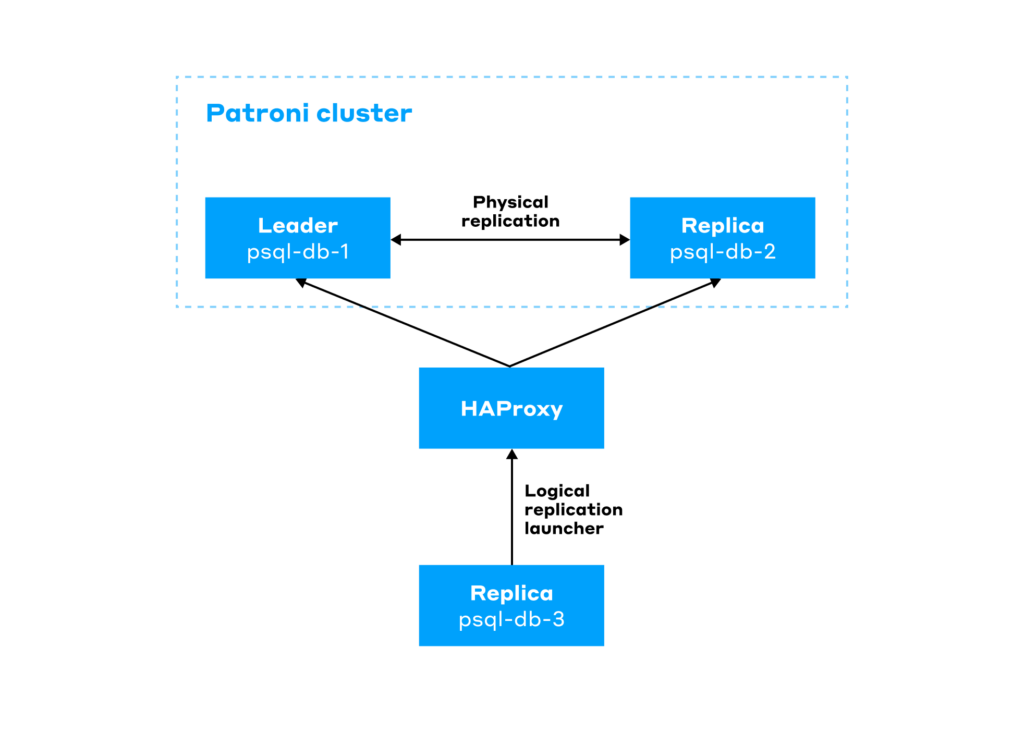
This diagram illustrates a two-node PostgreSQL cluster (psql-db-1 and psql-db-2) with physical replication configured between them. This cluster is managed by Patroni. On top of those two nodes is a standalone node (psql-db-3), which receives updates for one single table via logical replication. To make sure the psql-db-3 node connects to the Patroni leader, we route it through the HAProxy load balancer. HAProxy determines the current leader by sending an HTTP request to the Patroni API.
What could go wrong?
How Patroni handles logical replication slots
Starting with PostgreSQL 11, Patroni can handle logical replication slots via a feature called permanent replication slots, as described in Dynamic Configuration Settings and in the original PR.
To tell Patroni to automatically create a logical replication slot with the correct LSN marks on the leader node, just add the following settings to the Patroni configuration:
slots:
 permanent_logical_slot_name:
   type: logical
   database: db_name
   plugin: pgoutput
Once this block is added, Patroni will automatically create a logical replication slot named permanent_logical_slot_name on the leader node via pg_create_logical_replication_slot.
Beyond that, it also creates the same replication slot on any replica tagged with nofailover: false in the Patroni config. To achieve this, Patroni copies the slot state from the leader and reads the state file located in the pg_replslot directory via pg_read_binary_file. Then, it writes identical files onto the replicas and restarts PostgreSQL on them.
Once the slots are set up, Patroni advances the confirmed_flush_lsn on the replicas every loop_wait seconds (which defaults to 10 seconds and defines the interval for health checks and Distributed Configuration Store syncing). It adjusts the value based on DCS data using the pg_replication_slot_advance function.
Potential issues with this approach
At first glance, you might think that during a Patroni failover, the worst-case scenario for a logical replication slot would simply be resending some already-transmitted data to the logical replica (due to the confirmed_flush_lsn position lagging in the DCS). But you’d be mistaken.
The thing is, in production environments, when choosing between availability, data integrity, and performance, availability is often what ends up being sacrificed. That is, in order to boost performance, replication is set to asynchronous, meaning an auto-failover could actually cause data loss. So, automatic failover is disabled, and in the event of a database cluster leader failure, a user decides if a leader switchover shall be required.
But since automatic failover is turned off (replicas have the nofailover: true tag), Patroni won’t automatically pre-create the logical slots defined in the slots config on those replicas.
So, what will happen in the event of such a managed failover if the previous leader is unavailable, and the logical replica has been lagging at the moment of the failover? Let’s find out.
Experimenting with a lagged logical replica
Here is the initial state of our Patroni-managed cluster, with psql-db-1 being the leader:
patronictl list
+ Cluster: main (...) --------+---------+-----------+----+-----------+------------------+
| Member    | Host            | Role    | State     | TL | Lag in MB | Tags             |
+-----------+-----------------+---------+-----------+----+-----------+------------------+
| psql-db-1 | 192.168.100.101 | Leader  | running   | 38 |           | clonefrom: true  |
+-----------+-----------------+---------+-----------+----+-----------+------------------+
| psql-db-2 | 192.168.100.102 | Replica | streaming | 38 |         0 | clonefrom: true  |
|           |                 |         |           |    |           | nofailover: true |
+-----------+-----------------+---------+-----------+----+-----------+------------------+
Now, spin up a test database called paydata there and create a payment table in it, then insert a test record into it, and publish this table for logical replication:
CREATE DATABASE paydata;
\c paydata
CREATE TABLE payment (
   id INTEGER PRIMARY KEY,
   customer INTEGER NOT NULL,
   merchant INTEGER NOT NULL,
   sum INTEGER NOT NULL
);

INSERT INTO payment (id, customer, merchant, sum) VALUES (1, 0, 1, 1000);
SELECT * FROM payment;
id | customer | merchant | sum
----+----------+----------+------
 1 |        0 |        1 | 1000

CREATE PUBLICATION payment_pub FOR TABLE payment;
Now, on the psql-db-3 server, create a database named test and a payment table with an analogous structure:
CREATE DATABASE test;
\c test
CREATE TABLE payment (
   id INTEGER PRIMARY KEY,
   customer INTEGER NOT NULL,
   merchant INTEGER NOT NULL,
   sum INTEGER NOT NULL
);
Next, create a subscription connecting to the leader via HAProxy:
test=# CREATE SUBSCRIPTION payment_sub CONNECTION 'dbname=paydata host=192.168.100.10 user=REPLICA_USER password=REPLICA_PASS' PUBLICATION payment_pub;
NOTICE:  created replication slot "payment_sub" on publisher
Add the created replication slot to the Patroni DCS:
slots:
 payment_sub:
   database: paydata
   plugin: pgoutput
   type: logical
Check the contents of the payment table:
test=# SELECT * FROM payment;
id | customer | merchant | sum
----+----------+----------+------
 1 |        0 |        1 | 1000
(1 row)
As expected, the data also successfully arrived on the psql-db-2 replica via the physical replication slot.
Now, let’s simulate the logical replica lagging behind. You can do so by temporarily stopping PostgreSQL on psql-db-3:
pg_ctlcluster 16 main stopAfter that, add a new record to the test table on the psql-db-1 leader:
INSERT INTO payment (id, customer, merchant, sum) VALUES (2, 0, 1, 2000);Now, let’s mess some things up. Cut off network connections to both PostgreSQL and etcd on the psql-db-1 leader:
# Block incoming connections to PostgreSQL
iptables -A INPUT -p tcp --dport 5432 -j DROP
# Block incoming connections to Patroni from HAProxy
iptables -A INPUT -p tcp --dport 8008 -j DROP
# Block outbound traffic from Patroni to etcd
iptables -A OUTPUT -p tcp --dport 2379 -j REJECT
Well done, the cluster has lost its leader:
psql-db-2 ~ # patronictl list
+ Cluster: main (...) --------+---------+-----------+----+-----------+------------------+
| Member    | Host            | Role    | State     | TL | Lag in MB | Tags             |
+-----------+-----------------+---------+-----------+----+-----------+------------------+
| psql-db-2 | 192.168.199.102 | Replica | streaming | 40 |         0 | clonefrom: true  |
|           |                 |         |           |    |           | nofailover: true |
+-----------+-----------------+---------+-----------+----+-----------+------------------+
Suppose an on-call engineer steps in at this point, assesses the damage, and realizes there’s no way to promptly bring the leader back online. To initiate the failover, the engineer removes the nofailover tag from the replica. Patroni successfully performs the failover:
psql-db-2 ~ # patronictl list
+ Cluster: main (...) --------+--------+---------+----+-----------+-----------------+
| Member    | Host            | Role   | State   | TL | Lag in MB | Tags            |
+-----------+-----------------+--------+---------+----+-----------+-----------------+
| psql-db-2 | 192.168.199.102 | Leader | running | 41 |           | clonefrom: true |
+-----------+-----------------+--------+---------+----+-----------+-----------------+
… and automatically generates a replication slot on psql-db-2:
SELECT * FROM pg_replication_slots;
 slot_name  |  plugin  | slot_type | datoid |  database  | temporary | active | active_pid | xmin | catalog_xmin | restart_lsn | confirmed_flush_lsn | wal_status | safe_wal_size | two_phase | conflicting
-------------+----------+-----------+--------+------------+-----------+--------+------------+------+--------------+-------------+---------------------+------------+---------------+-----------+-------------
psql_db_1   |          | physical  |        |            | f         | f      |            |      |              | D/F0030D45  |                     | reserved   |               | f         |
payment_sub | pgoutput | logical   | 178410 | paydata    | f         | f      |            |      |       157213 | D/F0031E56  | D/F0033421          | reserved   |               | f         | f
(2 rows)
Since the psql-db-2 replica was perfectly in sync with the leader right before the crash, it got all the data. No data here was lost:
paydata=# SELECT * FROM payment;
id | customer | merchant | sum
----+----------+----------+------
 1 |        0 |        1 | 1000
 2 |        0 |        1 | 2000
(2 rows)
Now, let’s boot the logical replica on psql-db-3 back up, so it catches up:
pg_ctlcluster 16 main startHere we go: the data is missing due to the psql-db-3 replica lagging at the time of the crash and never made it to this replica:
test=# SELECT * FROM payment;
id | customer | merchant | sum
----+----------+----------+------
  1 |        0 |        1 | 1000
(1 row)
Unfortunately, it never will!
Let’s add another record to the test table on our new leader, psql-db-2:
INSERT INTO payment (id, customer, merchant, sum) VALUES (3, 0, 1, 3000);Here’s what the table looks like on the leader:
paydata=# SELECT * FROM payment;
id | customer | merchant | sum
----+----------+----------+------
 1 |        0 |        1 | 1000
 2 |        0 |        1 | 2000
 3 |        0 |        1 | 3000
(3 rows)
And here’s that same table on the logical replica:
test=# SELECT * FROM payment;
id | customer | merchant | sum
----+----------+----------+------
 1 |        0 |        1 | 1000
 3 |        0 |        1 | 3000
(2 rows)
This clearly demonstrates how a manual leader switchover in a Patroni cluster can result in data loss on a lagging logical replica, even though no data is lost in the main cluster.
If the old leader had still been reachable, the slot would have copied over perfectly. But in our case, Patroni just spun up a new slot on the new leader using the current LSN.
The solution
One potential way to fix this is by switching to automatic failover managed by Patroni. But if you’re using fully asynchronous replication, relying on automated failovers brings about the risk of uncontrolled data loss across the cluster.
Fortunately, starting with version 17, PostgreSQL offers a native approach to managing logical replication slots on replicas: replication slot synchronization.
To enable this feature, you’ll have to meet the following requirements:
1. You’ll need to have the following parameters enabled on the physical PostgreSQL replica:
sync_replication_slots = on
hot_standby_feedback   = on
Once you turn on slot synchronization, PostgreSQL will spin up a dedicated slotsync worker process. This process takes care of synchronizing any slots with the failover label.
2. The logical replication slot must be created on the leader with the failover parameter.
Here’s an example of how to create a subscription on the logical replica, which, in turn, tells the leader to create a slot with the correct parameter:
test=# CREATE SUBSCRIPTION payment_sub CONNECTION 'dbname=paydata host=192.168.100.10 user=REPLICA_USER password=REPLICA_PASS' PUBLICATION payment_pub WITH (failover = true);3. To prevent a scenario where the logical replica gets ahead of the physical replica, you must add the list of synchronized slots to the PostgreSQL configuration:
synchronized_standby_slots = 'payment_pub, one_more_pub, ...'When this parameter is set, the wal sender will wait until the physical replicas confirm they’ve received the corresponding WAL before sending data to the logical replica. If this order is violated, it might no longer be possible to resume logical replication from a new leader.
On top of tweaking the PostgreSQL configuration, you have to prepare Patroni for failover slots. Since the built-in replication slot synchronization mechanism at the DBMS level is being used, you no longer need Patroni to manage logical replication slots for you.
Add all logical replication slots to ignore_slots in the Patroni config as follows:
ignore_slots:
 - name: payment_sub
   type: logical
   database: paydata
   plugin: pgoutput
Otherwise, Patroni may delete slots that aren’t defined in its configuration.
An even better option is to upgrade Patroni to version 4.1.0 or higher. The thing is, the Patroni developers merged a PR into the 4.1.0 release (dated September 23, 2025) that prevents Patroni from interacting with any slots with the failover option set.
As a result, by pairing PostgreSQL 17+ with Patroni 4.1+, database administrators can now set up fault-tolerant logical replication using only native PostgreSQL features, without having to tweak the Patroni configuration.
Conclusion
If you’re using logical replication alongside Patroni, control how your logical replication slots behave during a manual failover. An even better option yet is to migrate to PostgreSQL 17+ and Patroni 4.1+ to fix this issue once and for all using the new slot synchronization feature.

Comments